How to Test Digital Wallet Payments: A Complete Guide
Digital wallets such as Apple Pay, Google Wallet, Samsung Pay, PayPal, Venmo, and a growing list of regional e-wallets have stopped being an "alternative" payment method. For mobile commerce across fintech, travel, iGaming, banking, and eCommerce, they are now the primary conversion driver. When the wallet checkout button works, conversion climbs. When it doesn't, users don't file a bug report; they abandon the cart.
That's the problem: wallet integrations look deceptively simple from the API and SDK documentation. In practice, they break in production in ways that never show up in a sandbox biometric authorization drops, tokenization mismatches, device and OS variations, regional banking rules that reject a transaction for reasons that have nothing to do with your code.
The stakes are higher than a typical QA bug. A broken login screen frustrates a user. A broken payment flow costs a completed transaction, and most users don't retry a failed wallet payment on the same merchant twice. For products where digital wallets already account for a large share of checkout volume, a single unhandled edge case in the Apple Pay or Google Pay flow can quietly suppress revenue for weeks before anyone notices, because the failure never shows up as a crash or an error log. It shows up as a drop-off that looks, at first glance, like normal churn.
The core challenge underneath all of this is simple to state and hard to solve: wallet payments can't be fully validated in a sandbox or a test environmeng. They require real devices, real regions, and real conditions. Sandbox test cards don't route through the same fraud checks, biometric prompts, or bank-side friction as a live transaction, so a flow that passes every sandbox test can still fail the moment it meets a real card, a real bank, and a real user's thumb. That's the thread running through everything below, and it's why crowd testing keeps coming up as the practical answer.
What Is Digital Wallet Testing?

Digital wallet testing is the process of validating the complete wallet payment flow, not just confirming that an API call returns a success response. A thorough test scope covers:
- Wallet availability and setup
- Adding or selecting a payment instrument
- Payment initiation
- Authentication
- Authorization
- Transaction confirmation
- Refunds, disputes, cancellations, and insufficient funds handling
- Cross-platform and cross-device consistency
- Post-payment status and notifications
Each of those stages carries its own way of quietly failing. Wallet availability and setup can break silently if a device doesn't meet the minimum OS requirement and simply doesn't show the wallet option, with no error message to flag why. Adding or selecting a payment instrument can fail when a card issuer isn't yet enrolled in a given wallet's tokenization program. Authentication can time out mid-biometric-scan. Authorization can succeed on the gateway side while the issuing bank declines a second later. None of these show up as a clean error state; they show up as a user staring at a spinner, or worse, a "success" screen for a payment that never actually settled.
It's worth drawing a clear line between two things that often get treated as one: testing the wallet integration (does the SDK talk to the gateway correctly, are tokens formatted properly) and testing the complete customer payment journey (can a real user, on a real phone, in a real region, actually pay you). A team can pass every integration test and still ship a checkout flow that fails for a meaningful share of real users, because integration testing validates the pipes, not the experience running through them. Apple Pay, Google Pay, PayPal, and the dozens of local mobile wallets used worldwide are examples of the surface you're covering, but the discipline isn't about knowing every wallet's name. It's about knowing how each one behaves differently under real conditions.
How Digital Wallet Testing Is Different from Typical Payments Testing
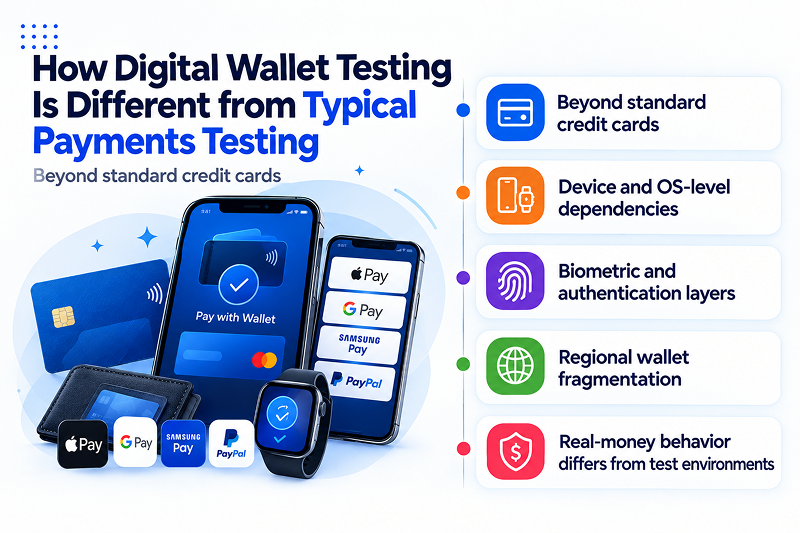
Beyond standard credit cards
A card payment is essentially a data-in, data-out transaction. For a digital wallet transaction, the chain before it gets to the bank is even longer:
User Interface Device Biometrics (Face ID / Fingerprint) Secure Element / Tokenization Payment Gateway Issuing Bank
Each of those layers can break on its own, and each wallet provider has its own SDK, token format, and failure modes.
Device and OS-level dependencies
Unlike cards, wallets are rigorously dependent on device operating systems and wallet app versions. Apple Pay works only on Apple hardware, and within those hardware platforms, Safari has historically changed how it handles the Apple Pay JS API with every update, breaking implemented sites that worked fine just a couple of versions before. Google Pay's behaviour varies across Android versions and manufacturer customisations; a Samsung device running a heavily-skinned version of Android may have significant differences from a stock Pixel running the same Android version-even if they carry the same version number.
This makes testing wallets a different animal from testing cards, in a way that cards are just not.
A card number can be entered into a Chrome form on a five-year-old Android phone or a box-fresh iPhone-while a wallet token can't.
Biometric and authentication layers
To make a purchase, most will need to be Face ID, fingerprint, or PIN-verified on the device itself. These flows need to be tested on multiple devices and OS versions, and have to interact with the app in ways automation can't simulate. The biometric prompt, for example, has to be designed to be discouraging to automation since the entire security premise relies on it actually being a human performing the action. So, someone has to show a finger on a sensor or face camera over and over across an appropriate set of devices to be confident the flow is robust.
Regional wallet fragmentation
In addition to Apple Pay and Google Pay, dozens of leading regional wallets (PIX in Brazil, WeChat Pay & Alipay in China, Grab Pay in SE Asia, etc.) have their own integration behavior, user authentication flow, and failure modes. An app that's nearly ubiquitous in one market might be nonexistent in another, while a flow that works perfectly for a US-issued card might have any number of peculiarities when trying to use that same flow with a card issued by a bank that must follow a different set of local rules. Approaching wallet testing as a one-size-fits-all experience doesn't work once you're live in multiple markets.
Real-money behavior differs from test environments
Production wallet transactions mean actual balances, actual authentication, and actual settlement behavior. Staging environments and sandbox modes are a simulation; they cannot emulate. The sandbox mode cannot simulate that a true unsuspected transaction pattern has set off an issuing bank's fraud model, or that a real wallet balance is actually short, not set to a full hardcoded test state. Those are the moments where production traffic and pre-launch testing are most different, and most dangerous if observed for the first time through a support queue.
That variety of wallet providers, OS versions, device types, region, and real-money conditions is really difficult to simulate yourself. And that's precisely what crowd testing is designed to help you do.
Core Test Categories
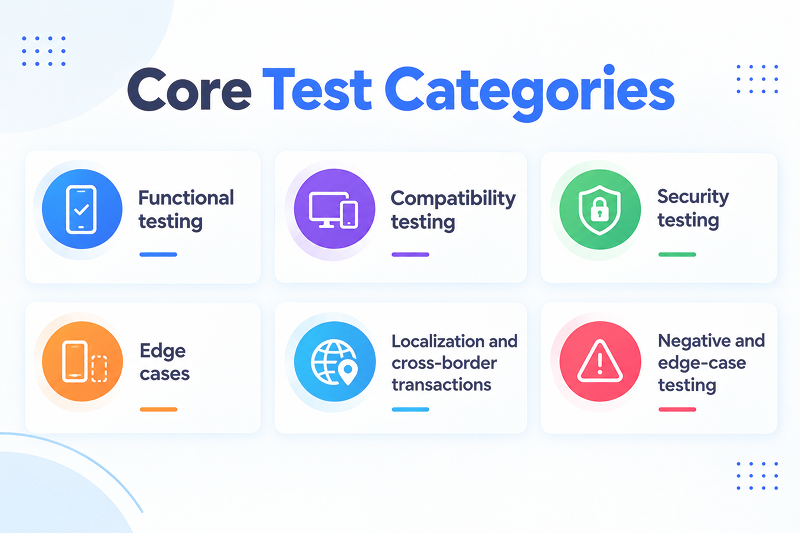
Functional testing
Adding a card, removing a card, default wallet selection, end-to-end checkout flow, partial approvals, insufficient funds, and expired card handling within the wallet itself. This is the baseline layer, and it's also the layer most teams already cover reasonably well. The failures that matter tend to show up one layer deeper, in how these functions behave under real-world variation rather than in a clean test account.
Compatibility testing
The device, OS, and browser matrix: iOS Safari vs. Chrome, Android fragmentation across manufacturers and OS versions, older devices still running unsupported OS builds that a meaningful slice of a user base may still carry. This is where crowd testers cover matrix gaps that a fixed device lab physically can't keep up with. A lab can own a representative set of current-generation devices, but it can't realistically own every combination of device, OS version, and wallet app version a real user base is actually running.
Security testing
Tokenization integrity (confirming the token generated on-device is what the gateway actually receives and processes), biometric authentication, and session handling, including what happens to an in-progress session if the app is backgrounded or the device locks mid-transaction.
Edge cases
Expired cards, insufficient funds, declined transactions, and network drops mid-payment. These are the scenarios most likely to be under-tested precisely because they're inconvenient to set up manually and easy to skip under a deadline, which is also exactly why they're where production incidents tend to originate.
Localization and cross-border transactions
Currency conversion, region-locked wallets, local payment method variants, and local compliance checks. In-region crowd testers catch issues that VPN-based testing routinely misses, because a VPN can fake a location but can't fake a local bank's behavior, a local card issuer's enrollment status, or a regional wallet's actual authentication flow.
Negative and edge-case testing
App minimization mid-payment, an incoming phone call arriving mid-biometric-scan, network throttling, low battery triggering a device's power-saving mode mid-transaction, and refund or chargeback processing back to the digital wallet. Individually, each of these looks like a minor edge case. Collectively, they represent the everyday reality of how people actually use their phones, which is exactly why they surface in production at a rate that surprises teams who only tested the happy path.
Wallet-Specific Considerations
- Apple Pay: Touch ID and Face ID flows, and Safari-only quirks in the web integration. The Apple Pay JS API behaves differently across Safari versions, and a flow validated on the latest iOS release can still fail silently for users who haven't updated.
- Google Pay: Android fragmentation and inconsistent browser support, plus device-level differences in how manufacturer-customized Android builds handle the underlying secure element.
- PayPal and other wallets: Redirect-based flows versus embedded flows, each with its own failure surface. A redirect flow introduces an extra dependency on the browser correctly returning control to the merchant app, which is itself a common source of abandoned transactions that look, in analytics, like a user simply changed their mind.
Every wallet has its own real-world quirks, and that's precisely the case for testing on real devices with real testers rather than emulators. An emulator can confirm the button appears. It can't confirm what happens when Face ID fails twice in a row on an iPhone with a cracked screen protector, on 3G, in a country where the issuing bank adds an extra verification step, and that combination of small, ordinary frictions is exactly what a real user's checkout attempt actually looks like.
Why Real Devices and Real Testers Are Critical Here
Simulators and emulators can't fairly emulate biometric authorization or an entire wallet app's behavior. Real credentials reveal what sandbox testing obscures. A sandbox/test environment transaction doesn't have the fraud checks, risk signals, or bank friction of a real one. Local wallet testing needs real testers in the regions they are testing: real bank account, real device. Exploratory testing by a tester who is truly trying to break the flow (not just following a script) reveals everything automated scripts miss.
Real network conditions matter too: the quirks of performance over patchy 4G/5G, pubic Wi-Fi, and VPNs reveal exactly the failures that won't happen on your office Wi-Fi.
This is where crowd testing fits. Instead of maintaining a device lab for every market and device combination, teams can access testers with the right devices, wallet versions, configurations, and local payment environments when needed. Testers also bring human judgment to the process, exploring the payment flow beyond predefined scripts and trying scenarios that may not have been anticipated in advance. This allows teams to expand real-world testing on demand and at scale, without constantly expanding and updating an in-house lab.
Conclusion
Digital wallet testing is not simply another item on a payment testing checklist. It needs to account for the devices, operating systems, wallet versions, authentication methods, payment flows, and regional conditions that shape the real customer experience.
A wallet can work perfectly in a controlled environment and still fail when a real customer tries to pay. That is why effective digital wallet testing needs more than automation and sandbox scenarios. It needs real devices, real users, real payment environments, and the human judgment to explore what happens when the flow does not go as expected.
Crowd testing makes that coverage possible at scale. With Ubertesters, companies can test digital wallet payments with real testers across real devices, markets, networks, and wallet configurations, helping uncover the issues that controlled testing can miss before they affect customers.
Ready to validate your digital wallet integration with real testers on real devices worldwide? Ubertesters can help you build and run a managed, real-world payment testing cycle. Connect with an Ubertesters QA specialist today.